


87
/ 100
SEO score
The word Remarketing may not sound very familiar, but surely at some point you have looked for a product, like a piece of furniture, in an eCommerce and not decided to buy it. But then, as you keep browsing, the ads shown on sites like Facebook and Google are related to that topic. That, my friend, is Remarketing.
If you still wonder today why this happens, you are going to get the answer to your question.
In other words, Remarketing is the set of actions or stimuli you try to apply to the user, based on their behavior and the life cycle stage they are in, to win them back once they have passed through your website or app.
Remarketing is essential to offer your products or services
Remarketing is one more technique within the advertising strategy you should carry out, and it can be of great importance within the marketing plan.
Let’s see step by step how to implement remarketing in Google Ads and Facebook Ads, as well as all the advantages and drawbacks.
What is Remarketing?
Remarketing runs advertising actions aimed at users who have already visited our website, ecommerce, etc. and have taken some kind of desired action.
This way you redirect the investment to people who have already shown some interest in your products or services.
In short, it is reaching users who already know your brand, products or services, bringing them back to your site so they take the actions you need.
An example:
- Mario goes into your eCommerce where you sell furniture.
- He visits a couple of products.
- He leaves the eCommerce without buying anything.
- You don’t sell a single chair.
What we want is for Mario to spend his money in our online store. For that to happen, we are going to launch ads that remind him of our brand and products, so he comes back and buys from us.
Let’s see how to do remarketing in Facebook Ads and in Google Ads, so you can create your advertising actions.
First of all, you must be very clear about where you want the ads to be shown:
- Google Ads: it will be shown on third-party websites, blogs, ecommerce and mobile apps, etc.
- Facebook Ads: It will be shown in the different parts of Facebook and Instagram.
This kind of advertising has a big advantage and makes conversion results very high, since our ads are only seen by people who have already been on our website, online store or app.
Remarketing strategies
Let’s look at 5 types, all with the same goal: to sell.
1. Standard
It shows the ad to the user who previously visited your website while they browse other websites or are on Facebook.
This type of campaign is useful to promote your brand or build customer loyalty.
2. Dynamic
The type of ad shown to the customer changes, for example showing different products or services they have visited.
These are the products or services they have already visited on your website.
3. Mobile apps
It is used to promote mobile apps related to that topic that the user has recently viewed.
4. Search
It shows ads to users who have searched for you on Google.
For this type of campaign, few people will arrive but the ROI generated is very high. This is because your ads are shown to people who are searching on a specific topic and are predisposed to buy.
5. Video
These are campaigns created on YouTube and shown when users have interacted with videos of a certain type.
The ads are shown on YouTube, on websites and in mobile apps with videos
What is the purpose of remarketing and how does it work?
As I said, the final goal is to impact again the users who have already visited our ecommerce, app, etc. so that they end up buying one of your products or services.
In short, we want the user who has already seen our ecommerce, app, etc. to know that it can help them with the need they have.
That is, it lets you position yourself in the user’s mind so they remember you when they want to make a purchase.
How does it work?
It has 4 steps:
- A user enters our platform (online store, website, app)
- The browser cookie marks them so we know they have visited our site.
- The user is added to a list that includes all those who meet certain behavior requirements defined by us.
- The campaign is created in Google Ads or Facebook Ads with that segmented list, who will be able to see the ads.
What are the pros of remarketing?

- High conversion: The campaigns generated by this system have a very high ROI, much higher than other types of campaigns.
- Segmentation: the type of customers is personalized to the maximum, making your ads highly segmented based on their buying cycle.
- Reach: it increases the number of users to impact based on behaviors
- Buying cycle: you are able to impact the user at the ideal moment of their buying cycle to optimize the advertising impact
- Many people in a short time: we can show it several times a day, a week or a month. Be careful not to be annoying.
- Better branding: a good way to stay in the user’s memory to improve the relationship so they come to you.
- Versatility: it lets you adapt the goals to the needs you have, such as buying products/services, sign-ups, downloads…
- Better CTR: the click-through rate is higher than the average of ads, that is, there is a higher chance that a user converts, which lowers the CPC
- Tailored lists: you can create lists by types of behavior so that your next campaign is aimed specifically at users who, for example, haven’t visited you for a while or have only visited certain pages.
What are the cons of remarketing?

- Slow process: this is the main drawback. You need a very large number of users on your site (several thousand a day) to then generate a list that can take weeks to optimize. TIP: create a traffic-building campaign in Facebook Ads to get visits quickly, then optimize your list.
- Qualified staff: you need a person with SEM knowledge to create and manage your campaigns. If you want a low conversion cost, you need a person with this profile.
- Excess repetition: if you are not careful with the ad frequency, you can tire users and become SPAM for them, creating the opposite effect to the one you wanted.
- Not reaching new users: you will not attract new users, only people who have previously interacted with you. You will need to create a customer acquisition campaign to reach those users who don’t know you.
Have you found any other drawback?
Write it at the end of the post as a comment.
Remarketing in Google Ads
We have already seen the theory. Now let’s see the practice with Google Ads (formerly Google AdWords).
As we saw before, to create a remarketing campaign for both Facebook and Google Ads we need to create a list of users we are going to target, on the premise that they have already visited our business.
And how are these lists created? We will get this information through browser cookies.
To do this we will have to add to the app or website/ecommerce a script adapted for remarketing, which Google Ads will provide.
How to create the remarketing list in Google Ads?
The steps are as follows:
- Log in to your account at Google Ads
- Go to tools, billing and settings and click on “Shared library > Audience Manager”.
- Set up the tag and fill in all the necessary fields
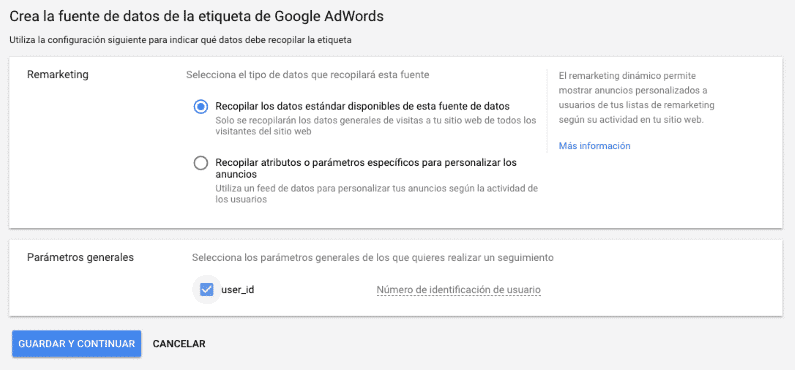
- Copy and paste the Ads tag that will appear at the bottom of the page and paste it into your website or Ecommerce. If you don’t know how, give it to your developer to insert it.
- Last step: once the tag is installed, you can start creating lists for your campaigns.
Another alternative is to create remarketing lists from Google Analytics (as long as you have Google Analytics linked with Google Ads).
How to set up your remarketing list in Google Ads?
To set up our first list so that only people who access our app, website or online store can see our ads, we have to go to “Shared library > Audience Manager > Audience lists” and click the “MORE” button we see at the top left.
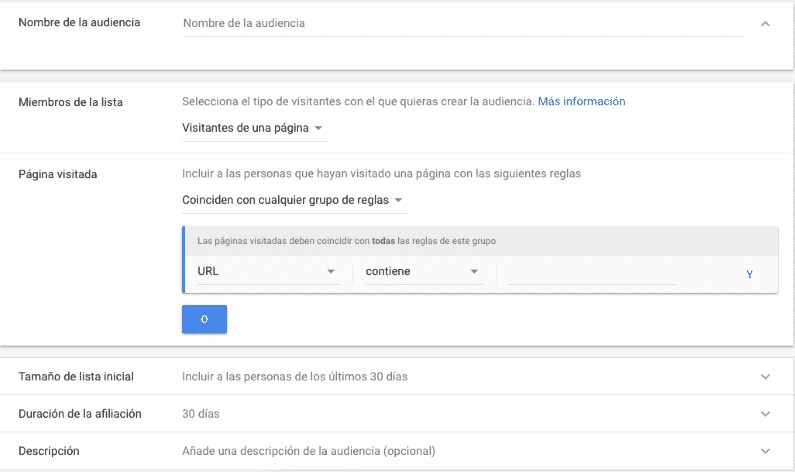
You have to fill in all the fields to create your first list.
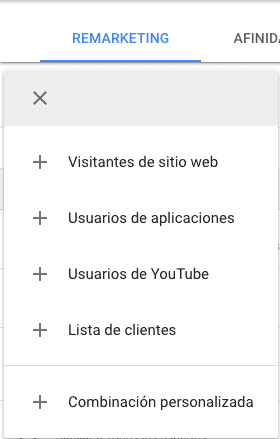
At this point you will have to answer some questions to know how you want to show your ads, such as:
- Do you want the ad to be seen by everyone who has entered your website?
- Do you want the ad to be shown only to people who have visited the contact page?
- Show it to people who left halfway through the buying process?
How to set up my remarketing list in Google Analytics?
You will have to go to Admin > Property > Audience definitions.
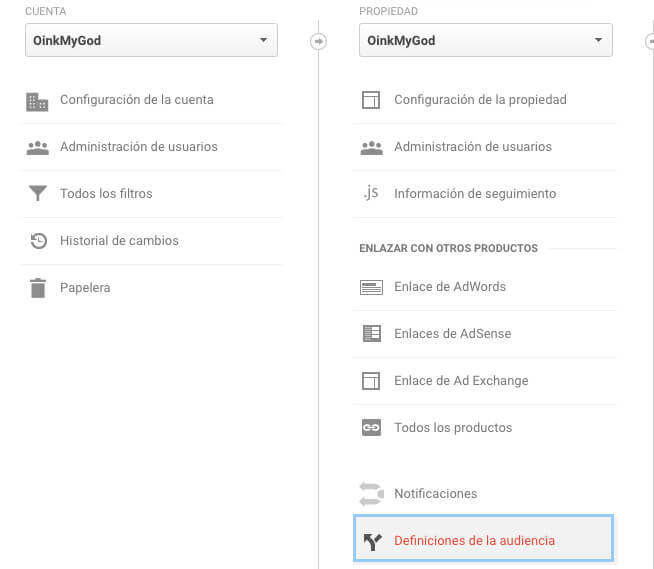
There you define the behaviors your list must record to generate the users, such as: visits to certain pages, time spent on the website, etc.
Once created, you will find it in Google Ads under Audience lists.
How to do remarketing in Display campaigns?
The Google Display Network is a group of pages, online stores, forums, blogs, mobile apps, etc. associated with the Google ads program, in which ads like yours are shown in those places.
These are the steps to set it up:
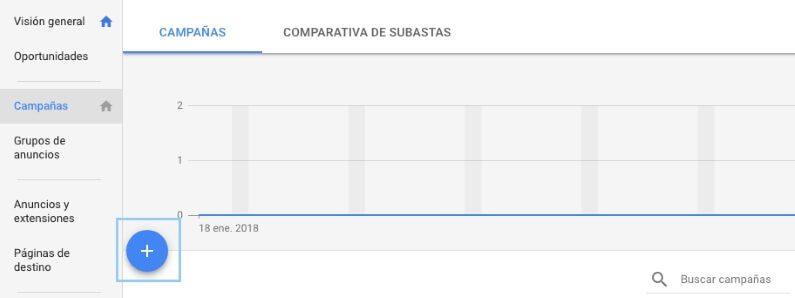
1. Go to the Campaigns section and create a new one with +Campaign.
2. Select “Display” and in goals, choose the one that best fits your brand.
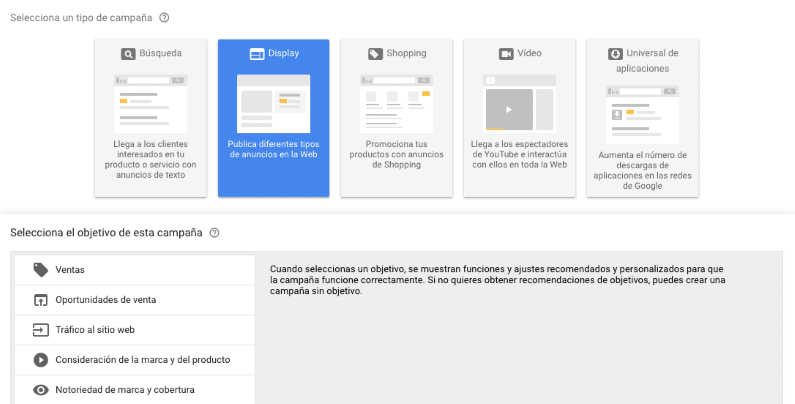
3. Choose “Standard display campaign”.
4. Write a name, select the locations, language, limit the budget, the schedule, define the bids (how much you are willing to pay compared with other advertisers), the rotation…
5. In Audiences select the list created in remarketing.
6. Add a name to the ad group and set a bid.
7. Create the ads this ad group will have, and add several types of ad to find out which works best.
8. Done, you have created your first campaign on the Google Ads Display Network.
How to do remarketing in search campaigns?
This type of ads is aimed at the Google search engine and they are text ads that appear at the top of the Google results page when a user does a search.
Remarketing campaigns were not designed for search engine campaigns, since Display is usually more effective, but I have to tell you it works quite well.
In this case, your ads will be shown when a user on your list does a specific search based on certain keywords in the search engine.
So in this case, besides creating a list, you have to indicate which keywords you will use for your ads to appear.
The way to set it up is as follows:
1. Campaigns section and create a new one with +Campaign.
2. Select “Search” and in goals.
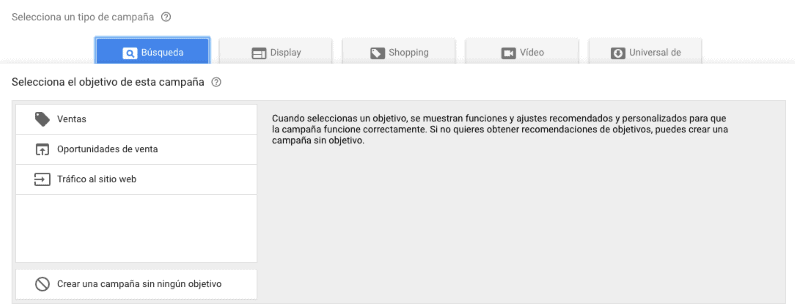
3. Choose “Drive visits to your website”.
4. Important, DO NOT include the Display Network in this campaign.
5. Add a name to the campaign, locations, languages, set a budget and bids, etc.
6. Set up the campaign, the ad groups and the ads.
7. Go to the “Audiences” tab and add your remarketing list.
8. All set
How to do a video remarketing campaign?
You can make your campaign more dynamic and create ads aimed at YouTube users. And why should you do it?
You should do it because it has some advantages, such as:
- It has a high ROI.
- It increases the reach and the audience to impact.
- The prices per click or view are cheaper.
How do I make my remarketing campaign in Facebook Ads?
We have finished with Google Ads and now we start explaining how to create your remarketing campaign with Facebook Ads.
Like Google Ads, we have to create in Facebook Ads a list of users we are going to impact with our ads, who of course have already visited our business or our Facebook or Instagram profile.
To create any list, we need to insert into your website a script called Facebook Pixel (it is the equivalent of the Google Ads script).
A tip
Also, since you are creating scripts, I would create the conversion pixel as well to do conversion tracking (purchases, PDF downloads, etc.) and so be able to track and optimize
The steps to create a list are:
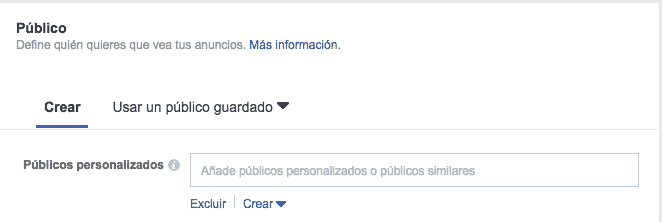
1. In theAudiences section of Ads Manager.
2. Click on Create audience > Custom audience.
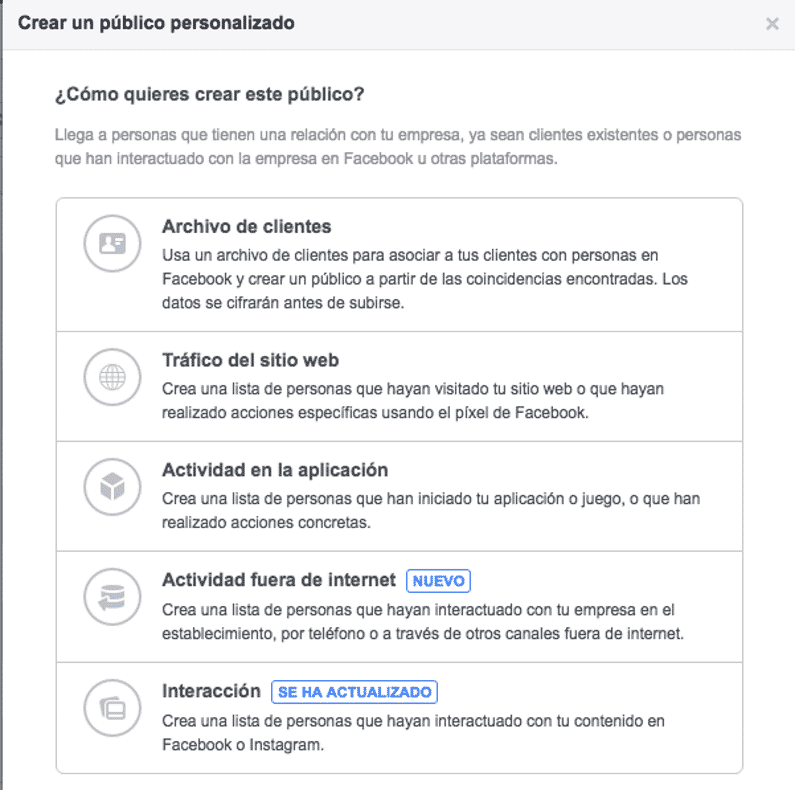
3. Select the type of audience you want to create:
- Customer file: if you have lists of users’ emails or phone numbers.
- Website traffic: users who have visited your website.
- App activity: only if you have a mobile app.
- Offline activity.
- Engagement: with your Facebook or Instagram profiles.
4. Depending on the option you chose, you will have to fill in some fields or others.
5. Once the audience is created, create a campaign in Facebook Ads and, in the section audiences > custom audience, choose the list.
It may also be useful to you → Create your Facebook strategy: steps, types and ways
What is Dynamic Remarketing?
Dynamic remarketing is the way of showing the user products or services they have previously visited in our ecommerce. In short, it means making ads that are super-personalized to each user behavior.
Surely you are familiar with Amazon ads, for example: if you have visited a type of product, such as furniture, when you go to Facebook it shows you Amazon ads with more furniture examples that may interest you.
As I said, in this case it is not necessary to create different campaigns and ad groups for each product/service you have in your ecommerce, website or app, since that could be crazy. The good thing is that it is also not necessary to create a list based on a specific segmentation
Google Ads and Facebook Ads do it automatically with a certain configuration.
In short, with dynamic remarketing, it shows the user highly segmented banners with products or services adapted to the user’s interest at that moment.
How are these campaigns created? You upload a spreadsheet with all the product information to Google Ads or Facebook Ads with all its attributes, such as: name, price, image, URL, features, colors, sizes, etc.
Using this Dynamic Remarketing option, you tell the platforms what they must show in each ad (copy, image, offer, final URL) depending on what the user has seen.
For Google Ads, here is the help you may need to create your dynamic campaign.
You only need to keep in mind that, to create a dynamic campaign in Google Ads, you must have an account enabled in Google Merchant with the products updated.
What you should know to create a good remarketing campaign
Now you know how to create a remarketing campaign in both Google Ads and Facebook Ads, so I’m going to give you some pointers you should take into account:
- Define a strategy and its structure well
- Limit the display frequency so you don’t tire the user.
- Create a list with your target audience. In fact, create as many lists as you need by behaviors, goals, etc.
- Create a list of users who have already bought from you to create specific ads such as cross selling, discounts, or to exclude them from your remarketing campaigns.
- Don’t take anything for granted: experiment, measure, evaluate and optimize what works.
- Adjust the message of your ads to the target audience that makes up your lists, since the user who has already bought is not the same as the one who has not, for example.
Lastly
Remarketing must be very present in your marketing and advertising strategy if you want users who haven’t bought to come back and complete their order, to get a buyer to trust you again, or to improve branding. This can be very powerful if you do it from Google Ads and Facebook Ads.
I look forward to your thoughts 🙂